How To Slow Down FPV Drone
How To Slow Down FPV Drone Using Throttle Scale in Betaflight and EdgeTX Radios
Updated 2026 • Mall of Aviation
Want to slow down FPV drone performance for better control? You are in the right place. One of the most common challenges in FPV drone flying — especially for beginners — is managing throttle control. FPV drones are extremely powerful machines with a very high thrust-to-weight ratio, which means even the smallest throttle input can result in rapid, dramatic altitude changes. This often leads to overcorrection, unstable hovering, uncontrolled climbs, and a generally inconsistent and frustrating flight experience.
If your drone feels too fast, twitchy, or simply overwhelming to control, you are absolutely not alone. Learning how to slow down FPV drone speed and throttle response is one of the most frequently requested skills among new pilots — particularly those transitioning into Acro mode (also known as manual or rate mode), where there is no automatic altitude stabilization and every movement of the drone is entirely determined by your stick inputs. In Acro mode, the drone does exactly what you tell it — nothing more, nothing less — which is simultaneously the most exciting and most challenging aspect of FPV flying.
The good news is that there are highly effective, tested methods to tame your drone’s throttle response and significantly improve your control precision — without permanently limiting performance or sacrificing your drone’s capabilities. The two primary tools available to you are Betaflight’s built-in throttle limit feature and EdgeTX radio mixer settings. Both methods serve the same fundamental goal but work at different levels of your FPV system, and understanding both gives you maximum flexibility.
In this complete guide by Mall of Aviation, we will walk through every aspect of how to slow down FPV drone throttle response — from the underlying physics of why FPV drones feel so powerful, to step-by-step configuration instructions in both Betaflight and EdgeTX, advanced dynamic scaling techniques, throttle expo, rate profiles, and the professional habits that will help you develop smooth, confident throttle control over time.
Table of Contents
- Understanding Throttle Sensitivity in FPV
- Why FPV Drones Feel Too Powerful
- What Is Throttle Scaling and How Does It Help Slow Down FPV Drone
- Benefits of Throttle Scaling
- How to Slow Down FPV Drone in Betaflight — Step by Step
- SCALE vs CLIP Explained
- Using Multiple Rate Profiles to Slow Down FPV Drone
- Motor Output Limit — Why You Should Avoid It
- Throttle Expo Explained
- How to Slow Down FPV Drone in EdgeTX Radios — Step by Step
- Advanced Dynamic Throttle Scaling in EdgeTX
- Betaflight vs EdgeTX — Which Method to Slow Down FPV Drone?
- Building Good Throttle Habits
- Pro Tips to Slow Down FPV Drone for Smooth Flying
- Common Mistakes to Avoid
- Conclusion
- FAQ
Understanding Throttle Sensitivity in FPV
Throttle sensitivity is the relationship between how far you move your throttle stick and how much thrust your drone actually generates in response. In most conventional aircraft and beginner-friendly drones, this relationship is relatively forgiving — you have a wide, usable range of throttle input that corresponds to gradual, manageable changes in lift.
In FPV drones, especially those running high-performance motors and aggressive propellers, this relationship is dramatically compressed. Most FPV quads hover — meaning they maintain a stable altitude with zero vertical movement — at only 20% to 35% of their total available throttle. This means that the entire usable range for fine altitude control is crammed into a tiny sliver of stick movement near the bottom of the throttle range.
For a new pilot, this creates an extremely challenging situation. Moving the throttle stick from 25% to 35% — which might feel like a barely noticeable nudge — can cause the drone to shoot upward with surprising speed. Moving it back down slightly too far causes an equally sudden drop. The result is the classic beginner “pogo stick” flight pattern: constant over-corrections, unstable hovering, and a drone that never seems to go where you want it.
Understanding this dynamic is the first step toward learning how to slow down FPV drone response effectively. According to Betaflight’s official documentation, the goal of throttle scaling is to spread that narrow usable range across a larger portion of your stick travel — giving you more precision and finer control over each degree of movement.
Why FPV Drones Feel Too Powerful — And Why You Need to Slow Down FPV Drone Response
There are several interconnected reasons why FPV drones feel so sensitive and powerful compared to consumer camera drones or beginner RC aircraft. Understanding these reasons helps you make better decisions about how to slow down FPV drone behavior for your specific setup:
- Extremely high thrust-to-weight ratio: A well-built 5-inch freestyle quad typically has a thrust-to-weight ratio of 8:1 or higher — meaning the motors can generate eight times the drone’s total weight in thrust. This is necessary for performing powerful maneuvers, but it also means the drone accelerates very quickly in response to even small throttle changes. According to Oscar Liang’s comprehensive FPV guide, most 5-inch quads are simply overpowered for beginner use without some form of throttle limiting.
- High-KV motors and aggressive propellers: FPV motors are wound for speed and responsiveness. Combined with large, pitched propellers, they can spin up to full power extremely quickly — leaving very little time for the pilot to react.
- Acro mode has no altitude hold: Unlike GPS camera drones that maintain altitude automatically, FPV drones in Acro mode respond only to real-time stick inputs. The moment you stop adjusting throttle, the drone does not hold its altitude — it simply maintains whatever vertical momentum it has built up. This requires constant, active throttle management from the pilot.
- Low hover throttle point: Hovering at 20–30% throttle compresses the usable control range into a small window near the bottom of stick travel, reducing resolution and making fine adjustments difficult.
- Fast ESC response: Modern FPV ESCs using DSHOT protocol respond to throttle commands in milliseconds. This near-instantaneous response is great for performance flying but can feel overwhelming to new pilots who are still developing their reaction speed and muscle memory.
All of these factors combine to create a flying experience that is thrilling for experienced pilots but genuinely intimidating for those just starting out. Knowing how to slow down FPV drone throttle response directly addresses several of these issues simultaneously.
What Is Throttle Scaling and How Does It Help Slow Down FPV Drone
Throttle scaling is the process of mathematically reducing the maximum throttle output your drone can produce — either at the flight controller level (in Betaflight) or at the radio transmitter level (in EdgeTX). When you set a throttle scale of 80%, for example, pushing your throttle stick to maximum will only generate 80% of the drone’s total available motor output, not 100%. This is the most effective way to slow down FPV drone performance for learners and cinematic pilots alike.
The key benefit of scaling — as opposed to simply “clipping” the top of the throttle range — is that the entire throttle curve is compressed proportionally. This means your hover point now sits at approximately 25–40% of stick travel instead of 20–30%, giving you significantly more stick resolution around the hover zone where precise control matters most.
Think of it like zooming in on the most important part of your throttle range. You are not losing any fundamental control capability — you are redistributing your stick movement to give more precision where you actually need it. The Betaflight GitHub wiki describes this approach as one of the most beginner-friendly configuration changes available in the firmware.
Benefits of Throttle Scaling to Slow Down FPV Drone
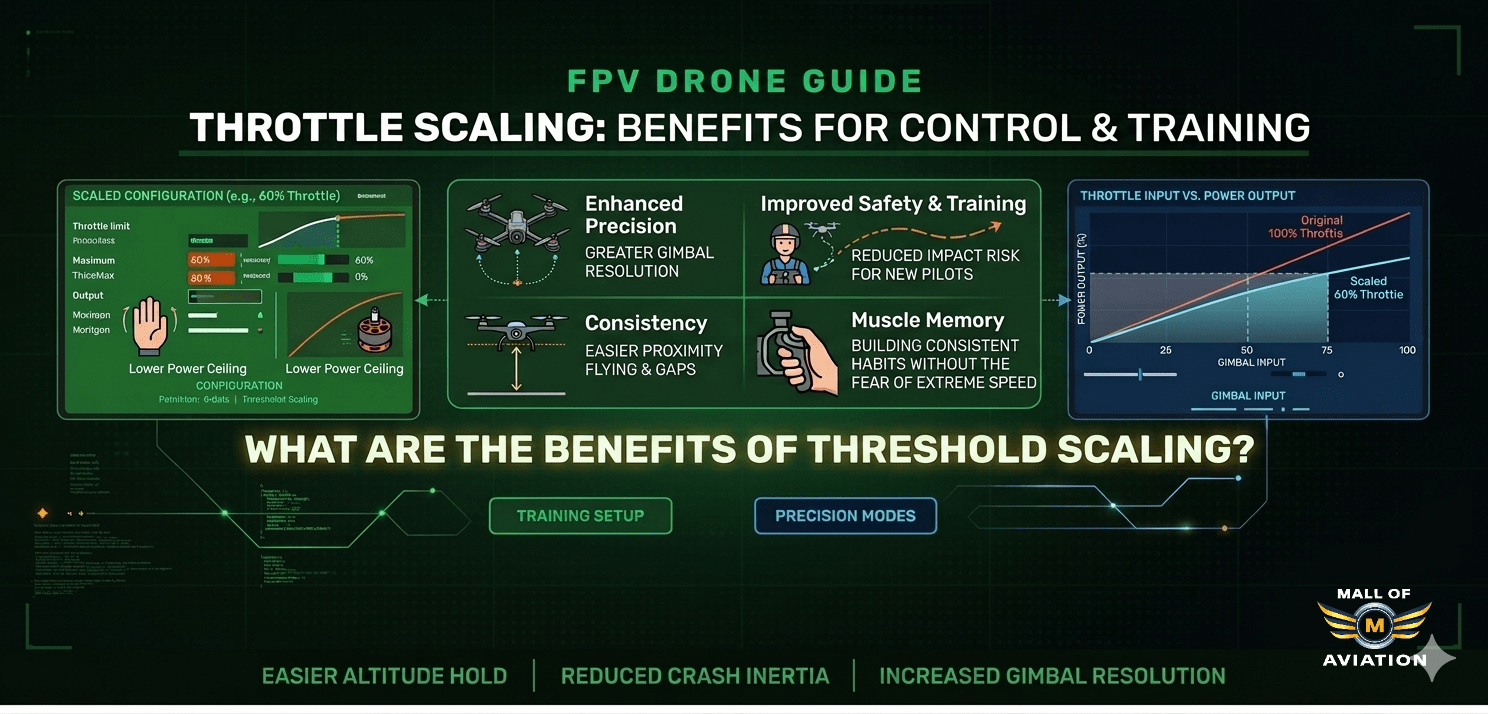
Throttle scaling is used by pilots at every level — not just beginners. Here is what it delivers across different skill levels when you want to slow down FPV drone performance:
- Reduced throttle sensitivity: Each millimeter of stick movement produces less vertical thrust, making it much easier to maintain a stable hover and make smooth altitude adjustments.
- Improved precision and smoothness: Cinematic FPV pilots use throttle scaling to achieve the buttery smooth footage that characterizes professional-grade aerial content.
- Prevents overcorrection: When the drone is less reactive, the natural tendency to over-correct is significantly reduced, leading to calmer, more controlled flights.
- Faster muscle memory development: With a more forgiving throttle response, beginners can develop accurate stick habits more quickly — habits that translate well when scaling is eventually removed.
- Useful for specific environments: Even experienced pilots reduce throttle scaling when flying indoors, in tight spaces, or near obstacles where full power would be dangerous.
- Safe skill progression: By gradually increasing the throttle limit over time — from 70% to 80% to 90% to 100% — pilots can progressively challenge themselves without jumping to full power prematurely.
How to Slow Down FPV Drone in Betaflight — Step by Step
Betaflight is the most widely used flight controller firmware in the FPV hobby, and it includes a native throttle limit feature that is straightforward to configure. Here is exactly how to slow down FPV drone throttle response using Betaflight:
What You Need
- Betaflight Configurator installed on your computer (latest stable version recommended — download from Betaflight’s official GitHub releases page)
- Your FPV drone connected via USB
- A few minutes to configure and save
Step-by-Step Configuration to Slow Down FPV Drone in Betaflight
- Open Betaflight Configurator and connect your flight controller via USB. Wait for the connection to establish fully.
- Navigate to the PID Tuning tab — this is the tab with the PID sliders and rate profile settings. It is typically represented by a graph or tuning icon in the left sidebar.
- Select “Rateprofile Settings” — at the top of the PID Tuning tab, you will see a section called Rateprofile Settings. This is where throttle limit settings are found.
- Locate the Throttle Limit section — you will see two settings: Throttle Limit Type and Throttle Limit Percent.
- Set Throttle Limit Type to “SCALE” — this is the recommended option to slow down FPV drone response effectively (more on SCALE vs CLIP below).
- Set the Throttle Limit Percent — enter your desired throttle ceiling. For beginners looking to slow down FPV drone performance, 70–80% is recommended. For cinematic flying, 85–90%. For racing and freestyle, you may eventually return to 100%.
- Click Save and Reboot — always save your changes and allow the flight controller to reboot fully before flying.
After saving, do a quick bench test by spinning up the motors briefly (with props off for safety) and checking that the maximum motor output feels reduced compared to before the change.
SCALE vs CLIP — Best Method to Slow Down FPV Drone in Betaflight
When configuring throttle limit in Betaflight to slow down FPV drone performance, you have two options for the limit type: SCALE and CLIP. Understanding the difference between them is important because they produce meaningfully different flight characteristics.
SCALE Mode — Recommended Way to Slow Down FPV Drone
In SCALE mode, the entire throttle range — from zero to maximum — is proportionally compressed to fit within the percentage you set. If you set 80%, the entire range from idle to maximum thrust is mapped to 0–80% of motor output. This means:
- Your hover point shifts slightly higher on the stick — giving you more stick travel and better resolution around hover
- The throttle response feels smoother and more linear throughout the entire range
- You retain full control authority at all points — nothing is “cut off” abruptly
- The flight characteristics feel natural and predictable
CLIP Mode
In CLIP mode, the throttle range below the set percentage behaves exactly as it normally would — the hover point stays in the same position, stick resolution in the hover zone is unchanged. However, once the throttle stick reaches the set percentage threshold, the output is hard-clipped and will not go higher regardless of how far you push the stick.
- Hover behavior is identical to no limit — no improvement in stick resolution
- Useful for specific situations where you want to preserve lower throttle feel exactly but prevent full power bursts
- Less smooth — the abrupt ceiling can feel unnatural and cause inconsistent responses near the limit
- Generally less useful for beginners than SCALE
For the vast majority of pilots — especially beginners trying to slow down FPV drone behavior — SCALE is the strongly recommended choice. It produces better control resolution, more predictable behavior, and a more natural flying experience.
Using Multiple Rate Profiles to Slow Down FPV Drone
One of Betaflight’s most powerful and underutilized features for managing how to slow down FPV drone speed in different contexts is the ability to create and store up to four separate rate profiles, each with its own throttle limit settings. This allows you to have completely different throttle behaviors available at a moment’s notice — switchable either through your radio transmitter using an assigned switch, or through Betaflight’s OSD (On-Screen Display) menu while in the field.
Here is an example of a practical four-profile setup that helps pilots slow down FPV drone response appropriately for each environment:
- Profile 1 — Beginner / Learning (65–70%): For practice sessions focused on precision hovering, slow flying, and building muscle memory. Maximum effort to slow down FPV drone speed for safe learning.
- Profile 2 — Cinematic / Smooth (80–85%): For filming sessions where smooth, controlled movements matter more than raw performance. Slightly reduced throttle ceiling for predictable, gentle responses.
- Profile 3 — Freestyle (90–95%): For standard freestyle flying with near-full performance. Enough power for maneuvers while still slightly smoothed out.
- Profile 4 — Indoor / Micro (55–65%): Maximum throttle reduction to slow down FPV drone speed for indoor flying in confined spaces, parks, or areas around people where full power would be genuinely dangerous.
To switch between profiles in flight, assign a 3-position or 4-position switch on your EdgeTX radio to the Betaflight rate profile selector channel. This can be set up in the Modes tab of Betaflight Configurator. Once configured, a simple flick of a switch changes your entire throttle behavior mid-session — extremely useful when moving between different flying environments.
Motor Output Limit — Why It Does NOT Slow Down FPV Drone Correctly
The Motor Output Limit setting in Betaflight is frequently confused with throttle scaling by new pilots attempting to slow down FPV drone performance, and this confusion can lead to genuinely problematic results. It is important to understand exactly what Motor Output Limit does — and why it is the wrong tool for controlling throttle feel.
Motor Output Limit is a feature designed to cap the maximum PWM or DSHOT signal sent to all motors simultaneously. It was originally intended as a safety feature for specific use cases — primarily running a drone on a test bench or in situations where you physically cannot afford full motor output due to external constraints. It is not designed for, nor does it behave well as, a method to slow down FPV drone behavior.
Using Motor Output Limit to slow down your drone causes several significant problems:
- Reduced PID authority: The flight controller’s PID loops need headroom above the steady-state motor output to make rapid corrections. Capping motor output removes this headroom, causing the PID controller to saturate during any demanding maneuver or gust of wind — resulting in wobbles, oscillations, and loss of control.
- Instability under load: When the drone encounters turbulence, wind, or attempts to execute even moderate maneuvers, it may not have enough motor headroom to maintain stability — causing alarming behavior at the worst possible moments.
- Incorrect behavior in Acro mode: Motor Output Limit interacts poorly with Betaflight’s Acro mode calculations, producing unpredictable response curves that make the drone harder to control, not easier.
- False sense of security: The drone may seem easier to control in calm hover conditions, but behave dangerously when challenged — giving the pilot a false sense of confidence.
The bottom line: always use the Throttle Limit SCALE feature to slow down FPV drone response, and leave Motor Output Limit at its default setting unless you have a very specific technical reason to change it.
Throttle Expo — Another Way to Slow Down FPV Drone Feel
Throttle Expo is another throttle management tool available in Betaflight that can help slow down FPV drone sensitivity in the mid-throttle range. It works very differently from throttle scaling — instead of reducing the overall maximum output, Throttle Expo modifies the shape of the throttle response curve, making the response around center (mid-throttle) more gradual while preserving full power at the top of the stick.
Visualize the throttle curve as a graph: with zero expo, it is a straight diagonal line from 0% to 100%. With positive expo applied, the line curves — it rises more slowly in the middle section and then steepens toward the top. The practical effect is a softer, more progressive feel around the hover zone, transitioning to normal powerful response as you push toward maximum throttle.
- Advantage: Preserves full maximum throttle for when you need it — useful for freestyle pilots who want smooth cruise control but still want maximum burst power available
- Advantage: Makes mid-throttle cruise feel more relaxed and less twitchy — effectively helping to slow down FPV drone feel in the cruise range
- Disadvantage: Less linear and predictable than straight scaling — the non-linear curve can be confusing to new pilots who are still developing their throttle intuition
- Disadvantage: Does not improve hover-zone stick resolution in the same way that SCALE does
Recommendation: Throttle Expo is a useful tool for intermediate and advanced pilots fine-tuning their feel, but it is not the best starting point for beginners trying to slow down FPV drone response. Start with SCALE throttle limiting, develop your fundamental throttle control, and experiment with Expo later once you understand how your drone responds to different curve shapes. The Joshua Bardwell YouTube channel has excellent deep-dive videos explaining throttle expo behavior visually if you want to learn more.
How to Slow Down FPV Drone in EdgeTX Radios — Step by Step
EdgeTX (and its predecessor OpenTX) is the open-source firmware that powers most modern FPV radio transmitters including the RadioMaster Boxer, TX16S, Zorro, and BetaFPV Lite Radio 3. EdgeTX offers its own native throttle scaling capability through the Mixer — and this method has a significant advantage over Betaflight scaling when you want to slow down FPV drone response: it applies universally to every drone you bind to that radio, regardless of what flight controller firmware they run.
You can find detailed documentation for EdgeTX mixer settings on the official EdgeTX website, which is regularly updated with the latest firmware guides and tutorials.
Step-by-Step EdgeTX Mixer Configuration to Slow Down FPV Drone
- Power on your radio and navigate to the model for the drone you want to configure.
- Open the Mixer page — long press the MDL button (or navigate via the menu) and select Mixer.
- Find the throttle channel — this is typically Channel 3 (CH3) in AETR channel mapping, or Channel 1 (CH1) in some setups. Identify which channel your throttle stick controls.
- Edit the throttle mixer line — press Enter on the throttle channel to open its settings.
- Reduce the Weight value — Weight controls the scaling factor for this channel. A value of 100 means full range. Reducing it to 80 scales the output to 80% of the full range. For beginners wanting to slow down FPV drone behavior, set Weight to 70–80.
- Set the Offset value — because reducing Weight compresses the range symmetrically around the center point, you need to add an Offset to ensure your minimum throttle still reaches zero (motor stop). For a Weight of 80, an Offset of approximately -20 is typically needed. Test carefully to confirm your throttle minimum reaches zero and does not arm motors unintentionally.
- Save the model and test on the bench with propellers removed before flying.
Advanced Dynamic Methods to Slow Down FPV Drone in EdgeTX
EdgeTX’s powerful Mixer and Global Variables system allows advanced pilots to create truly dynamic throttle scaling — where the throttle limit can be adjusted in real time using a physical knob, slider, or switch on your radio without landing or reconnecting to Betaflight. This is an incredibly useful feature for pilots who want to slow down FPV drone response on the fly when transitioning between different flying environments.
Method 1: Using a Rotary Knob or Slider to Slow Down FPV Drone Dynamically
This is the most intuitive dynamic method to slow down FPV drone performance. You assign a physical knob or slider on your radio as a real-time throttle scaling controller. As you rotate the knob, the throttle ceiling adjusts live — giving you instant, tactile control over how powerful your drone feels without touching any software.
- Assign the knob input as a source in the Mixer for your throttle channel
- Configure the knob range to span your desired scaling range — typically from 50% to 100%
- At full knob clockwise: 100% throttle (full power, performance mode)
- At full knob counterclockwise: 50% throttle (maximum slow down FPV drone mode for indoor use)
- Any position in between gives you a smooth, infinitely adjustable throttle ceiling
Method 2: Using Global Variables and Flight Mode Switches
For pilots who prefer defined, discrete throttle settings rather than a continuously adjustable knob, EdgeTX’s Global Variables (GVARs) allow you to program specific throttle scaling values that are triggered by flight mode switches.
- Navigate to the Special Functions or Global Variables page in your model settings
- Create Global Variable entries that define your desired throttle scale percentages (e.g., GVAR1 = 70, GVAR2 = 85, GVAR3 = 100)
- Assign each GVAR value to a position on a 3-way switch on your radio
- In the Mixer, reference the GVAR as the weight source for your throttle channel
- Flipping your switch between positions instantly changes how much you slow down FPV drone response to the pre-programmed value
This method is particularly useful for pilots who switch between indoor flying (slow down FPV drone to 70%), cinematic filming (85%), and full freestyle (100%) regularly — allowing instant, repeatable throttle profile changes with a single switch flip, without needing to land and reconfigure anything.
Betaflight vs EdgeTX — Which Method Best Helps Slow Down FPV Drone?
Both methods achieve the same fundamental goal of helping you slow down FPV drone throttle response, but each has distinct advantages depending on your situation:
- Use Betaflight scaling to slow down FPV drone when: You want drone-specific settings, you fly multiple drones with different throttle requirements, or you want to use Betaflight’s rate profiles to switch between different throttle limits using radio switches without mixer configuration.
- Use EdgeTX scaling to slow down FPV drone when: You want a single setting that applies to all your drones automatically, you want real-time dynamic control using a knob, or you are flying drones that do not run Betaflight (such as Whoop drones with older firmware).
- Use both together when: You want the most comprehensive control — EdgeTX handles your baseline scaling while Betaflight profiles allow fine-tuned drone-specific adjustments on top of the radio-level setting.
Building Good Throttle Habits After You Slow Down FPV Drone
Throttle scaling is a tool — but the ultimate goal is to develop genuine throttle control skill that works at any power level. Once you have used scaling to slow down FPV drone response and built your foundational skills, here are the habits that the best FPV pilots cultivate consistently:
- Develop a “feel” for hover point: Spend deliberate time practicing sustained hover at a fixed altitude. This builds the muscle memory to intuitively know where the hover throttle point is without consciously thinking about it — which frees your attention for navigation and maneuvering.
- Use slow, deliberate stick movements: Fast, jerky throttle inputs create instability and make flight harder, not easier. Train yourself to move the throttle smoothly and gradually, even when making significant altitude changes.
- Practice altitude drills: Set up a specific altitude target and practice ascending to that exact altitude, holding it for 10 seconds, descending, and repeating. This drill directly trains precise throttle management.
- Simulator time is essential: FPV simulators like Velocidrone, Liftoff, and DRL Simulator give you unlimited practice time with zero crash cost. Spending 15–20 minutes per day in the simulator accelerates your throttle control development dramatically.
- Progressively reduce scaling over time: Every two to four weeks, increase your throttle limit by 5–10% and fly at the new level until it feels comfortable. This systematic approach ensures you are always slightly challenged but never overwhelmed — the ideal learning state.
Pro Tips to Slow Down FPV Drone for Smoother Flying
- Start every new drone at 70–75% throttle limit: Even if you are an experienced pilot, every new drone has different power characteristics. Starting with reduced throttle to slow down FPV drone response gives you time to learn the specific feel of that quad before pushing it to full power.
- Adjust throttle limit to match your flying environment: Open field freestyle deserves more power than a tight garden or indoor space. Get into the habit of adjusting how much you slow down FPV drone speed to match where you are flying.
- Combine throttle scaling with smooth rates: Smooth rate settings for roll, pitch, and yaw combined with throttle scaling creates a comprehensively more manageable flying experience. These two adjustments work synergistically.
- Record your flights and analyze throttle behavior: Watching your DVR footage with attention to altitude consistency is one of the best ways to identify throttle control weaknesses you may not notice in the moment.
- Do not compare your settings to others: Every pilot’s ideal throttle scaling is personal and depends on their specific drones, flying style, and experience level. Focus on what works for your progression rather than copying settings from YouTube videos.
Common Mistakes When Trying to Slow Down FPV Drone
- Using Motor Output Limit instead of Throttle Scale: As covered in detail above, this creates instability and removes PID authority. Always use the Throttle Limit SCALE feature in Betaflight to slow down FPV drone response correctly.
- Setting throttle limit too low and never increasing it: Flying at 50–60% indefinitely prevents you from developing the muscle memory needed for real-world flight at full power. Gradually step up your limit every few weeks.
- Forgetting to set the correct Offset in EdgeTX: Reducing Weight in the EdgeTX mixer without applying the corresponding Offset can leave your minimum throttle above zero — meaning motors may not fully disarm when you drop the stick. Always verify minimum throttle output after making mixer changes.
- Over-relying on scaling instead of practicing throttle technique: Using scaling to slow down FPV drone speed is helpful, but it does not replace the need for genuine skill development. Use it as a scaffold that you progressively remove as your skills grow.
- Not testing settings safely before flying: Always test any new throttle configuration on the bench with propellers removed before your first flight.
- Ignoring simulator practice: Many pilots spend hours watching tutorials about how to slow down FPV drone response while never actually practicing in a simulator. Real skill comes from repetition — and the simulator is the safest, most efficient place to get that repetition.
Conclusion — The Right Way to Slow Down FPV Drone for Better Control
Learning how to slow down FPV drone throttle response is one of the most fundamental and impactful skills in FPV flying. It is the difference between a drone that feels chaotic and unpredictable and one that feels like a precise extension of your intentions. Developing smooth, confident throttle management takes time and deliberate practice — but the techniques covered in this guide give you the tools to accelerate that development significantly.
By using Betaflight’s SCALE throttle limit and EdgeTX mixer weight settings to slow down FPV drone response, you can create a flying experience that is appropriately challenging without being discouraging. Multiple rate profiles give you flexibility across different flying environments. Dynamic knob-based scaling gives advanced pilots real-time control. And the consistent application of good throttle habits — slow movements, hover drills, simulator practice, and progressive limit increases — builds the skill foundation that will serve you for your entire FPV journey.
Remember: knowing how to slow down FPV drone performance is a powerful learning tool and a legitimate technique even for advanced pilots. Use it intelligently, increase your limits progressively, and always keep practicing. The day you can hover precisely at 100% throttle limit in Acro mode with complete confidence is an incredibly satisfying milestone — and every flight between now and then is part of the journey.
Mall of Aviation stocks a full range of FPV drones, radios, flight controllers, and accessories to support your progression at every level. Visit our store to find everything you need to set up your ideal FPV flying experience.
Frequently Asked Questions (FAQ) — How to Slow Down FPV Drone
What is the easiest way to slow down FPV drone speed?
The easiest and most effective way to slow down FPV drone throttle response is to use Betaflight’s Throttle Limit feature set to SCALE mode. Open Betaflight Configurator, go to the PID Tuning tab, find Rateprofile Settings, set Throttle Limit Type to SCALE, and reduce the percentage to 70–80%. This immediately makes your drone feel more manageable without any hardware changes. Save and reboot, then bench test with props removed before flying.
What throttle limit percentage should I use to slow down FPV drone?
For most beginners trying to slow down FPV drone performance, a throttle limit of 70% to 80% is an excellent starting point. This provides a noticeably more manageable flying experience while still giving you enough power to fly outdoors in mild wind conditions. After a few weeks of practice, gradually increase to 85%, then 90%, and eventually work toward full 100% throttle as your skills develop.
Does slowing down FPV drone with throttle scaling damage my motors?
No — using throttle scaling to slow down FPV drone performance has no negative effect on your motors, ESCs, or any other hardware. It simply limits how hard the motors are driven. In fact, flying at reduced throttle limits may slightly extend motor and ESC lifespan by reducing heat generation. There is no downside to using throttle scaling correctly.
What is the difference between SCALE and CLIP when you slow down FPV drone?
SCALE is the recommended way to slow down FPV drone response because it compresses the entire throttle range proportionally, improving stick resolution around the hover zone and producing a smoother, more predictable response. CLIP simply hard-caps the throttle at the set percentage without improving hover-zone resolution — the response above the cap is abruptly cut off. For most pilots trying to slow down FPV drone behavior, SCALE produces significantly better results.
Can I use EdgeTX radio to slow down FPV drone instead of Betaflight?
Yes — you can slow down FPV drone response directly in EdgeTX by reducing the Weight parameter for the throttle channel in the Mixer and adding a corresponding negative Offset to ensure minimum throttle still reaches zero. This method has the advantage of applying universally to all drones bound to that radio. Both Betaflight and EdgeTX methods are valid — many advanced pilots use both simultaneously for maximum control flexibility.
What is throttle expo and does it help slow down FPV drone?
Throttle expo modifies the shape of the throttle response curve, making it more gradual in the middle range while preserving full power at maximum stick. It can help slow down FPV drone feel in the mid-throttle cruise range, but unlike SCALE it does not reduce the maximum output. It is more useful for intermediate pilots fine-tuning their feel than for beginners. Start with SCALE to slow down FPV drone response and explore expo later once you are comfortable.
Should racing pilots slow down FPV drone with throttle scaling?
Yes — many competitive racing pilots use throttle scaling to slow down FPV drone response during training to improve precision and consistency through technical gate sequences. During actual competition they may remove it, but throttle scaling during practice builds cleaner throttle habits that benefit race performance even at full power. It is also commonly used in practice sessions on new or unfamiliar tracks.
Does throttle scaling permanently slow down FPV drone performance?
No. Using throttle scaling to slow down FPV drone performance is a software setting that can be changed at any time in either Betaflight Configurator or EdgeTX. It does not modify any hardware, firmware, or permanent configuration. You can increase it, decrease it, or remove it entirely at any time with no lasting effect on your drone’s capabilities.
Can I switch between profiles that slow down FPV drone differently during a session?
Yes. In Betaflight, you can set up multiple rate profiles — each with a different throttle limit to slow down FPV drone response to different degrees — and assign a switch on your radio to change between them. This allows you to switch between, for example, a conservative indoor profile (maximum slow down) and a full-power freestyle profile using a single switch flip, without landing or connecting to Betaflight Configurator.
How do I know when I no longer need to slow down FPV drone?
A good indicator that you are ready to reduce how much you slow down FPV drone response is when you can consistently hover at your current throttle limit for 30+ seconds with minimal altitude drift, make smooth controlled altitude changes on demand, and fly a simple circuit without any sudden over-corrections. When these feel easy and natural at your current limit, increase by 5–10% and begin the process again at the new level.